
 2026-08-12
Control Your Campaigns Without Opening the Dashboard
What if you could manage your PropellerAds campaigns without ever logging into the dashboard?
With the PropellerAds SSP MCP Connector, your preferred AI Agent can do it for you.
How Does the Connector Work?
The setup starts with a **.mcpb** file, which connects your AI Agent to your PropellerAds account. You can download it from your account settings or directly through NIKO AI.
After installing the file on your computer, generate an API token in your PropellerAds account settings.
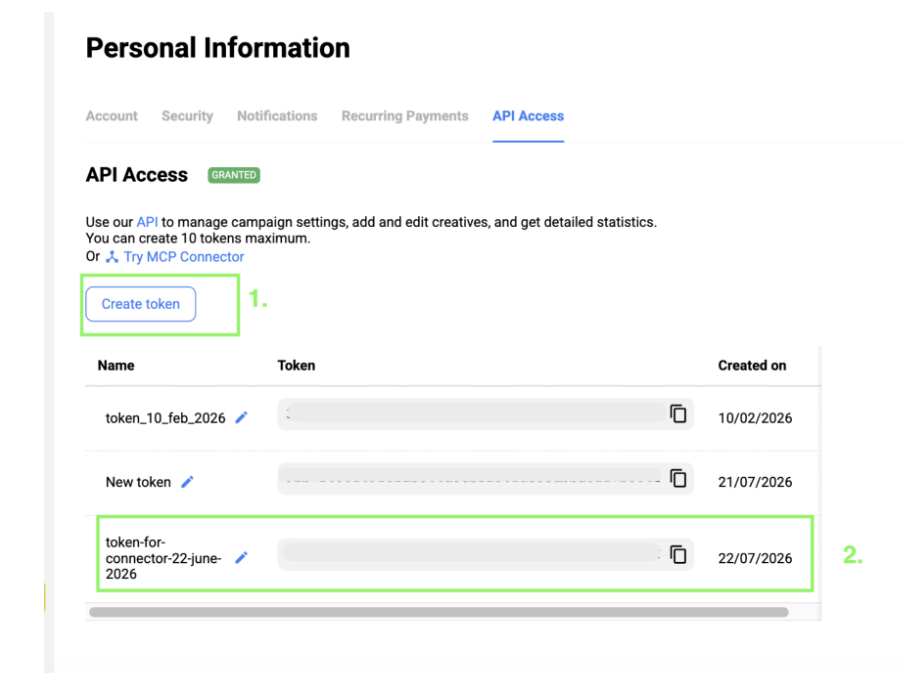
Add the token to the connector configuration, and you're ready to go.
Once connected, your AI Agent can work with your advertiser account directly.
What Can It Do?
View Campaigns
Retrieve your campaign list, filter campaigns by status, format, or ID to quickly check what's currently running.
Create New Campaigns
Launch campaigns across all supported formats with complete configuration, including target URL, pricing model, country bids, budgets, schedules, and advanced targeting (GEO, device, OS, browser, language, connection type, and VPN traffic).
Update Existing Campaigns
Modify live campaigns without opening the dashboard. Adjust bids, budgets, target URLs, GEOs, schedules, campaign status, and other settings whenever needed.
Manage Rates
Request recommended bids for any GEO, format, device, or audience. You can also retrieve current campaign and zone bids and update them directly through your AI Agent.
Configure Targeting
Review and update targeting at the campaign, zone, or subzone level. Access reference lists for countries, regions, cities, devices, operating systems, browsers, languages, and mobile carriers to ensure accurate targeting.
Manage Creatives
Add, edit, pause, or relaunch creatives without leaving the conversation.
Check Balance and Performance
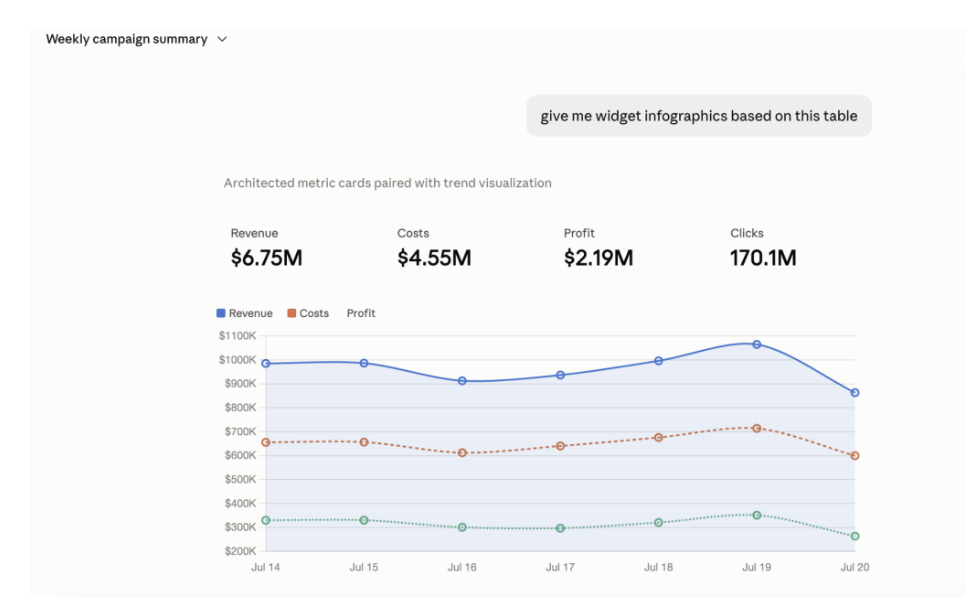
View your account balance or request campaign statistics directly in chat.
A few examples of the connector in Claude:
Why Use the SSP MCP Connector?
Beyond eliminating repetitive manual work, the connector helps simplify everyday campaign management.
Access Campaign Data Faster
Instead of opening the dashboard, ask your AI Agent for campaign performance, account balance, or campaign status and receive the information directly in chat.
Resolve Issues Without Leaving the Conversation
When reviewing campaign performance with your AI Agent, you can immediately make adjustments without switching between tools or losing context.
Simplify Team Access
Adding new team members traditionally requires separate account setup and verification. With the SSP MCP Connector, simply share the **.mcpb** file. Each teammate adds their own API token and can start working immediately through their preferred AI Agent.
The connector isn't designed to replace the dashboard. It simply removes the need to open it every time you need information or want to make a quick update.
Is It Safe?
Security is one of the first questions advertisers ask, so here's how it works.
Do I share my PropellerAds login credentials?
No.
The connector uses an API token generated in your PropellerAds account settings instead of your login and password. The token can be revoked at any time.
Treat it like any other sensitive credential. Anyone with access to the token can access your MCP scope. If necessary, generate a new token in your account settings to immediately invalidate the previous one.
Is the Token Stored Anywhere?
PropellerAds stores the token because it validates every request made through the API.
AI providers such as OpenAI or Anthropic do not receive or store the token. It remains in a local configuration file on your computer and is sent directly to PropellerAds. The AI model itself never has access to it.
Can the AI Agent Change My Campaigns on Its Own?
No.
The AI Agent only performs the actions you explicitly request. It never makes autonomous changes.
Does Every Team Member Need a Separate Setup?
No.
Simply share the **.mcpb** file. Each team member adds their own API token and can begin managing campaigns through their preferred AI Agent.